Microsoft Clarity now lets brands refine their AI visibility reporting
Clarity lets brands edit terms used in AI Visibility reporting. Review aliases, avoid ambiguity and interpret reporting changes carefully.
 Will Slatton2 min read
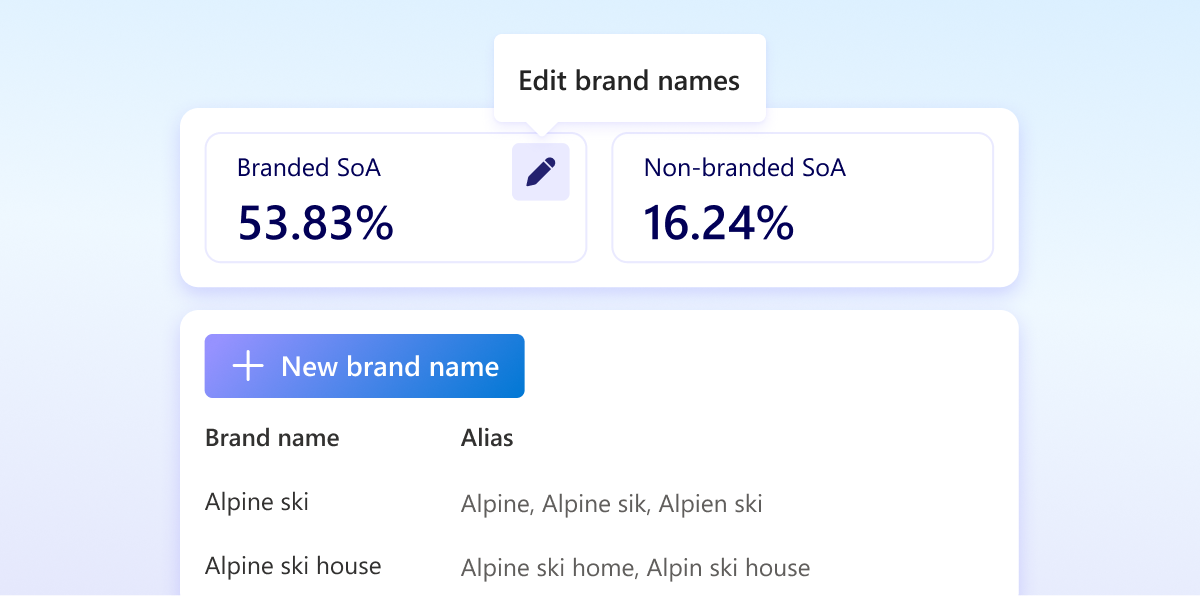
Microsoft Clarity now lets businesses edit the Brand Terms used to classify branded queries in its AI Visibility dashboard. For merchants whose brands appear under abbreviations, alternative spellings or local names, the update offers a way to make that reporting better reflect their business.
Microsoft’s 29 September announcement explains that users can add, edit or remove terms under Settings → AI Visibility. Clarity supplies an initial list that businesses can refine.
What the new controls change
Related terms can sit beneath a Brand Name. Users can then filter reporting by the overall brand or inspect an individual term. Microsoft gives abbreviations, translations and common misspellings as examples of variants worth considering.
This is a classification control. Adding a term is not evidence that an AI assistant has started recommending your products more often. It changes how you describe the brand for reporting purposes.
Build a list that reflects real customer language
Our recommendation is to begin with names customers demonstrably use. Review your own search queries, support messages and campaign naming before adding a large speculative list.
For an imaginary retailer called Harbour & Pine, candidate variants might include “Harbour and Pine” and a commonly used abbreviation. Those are illustrative examples, not observed Clarity queries. An abbreviation shared by several unrelated businesses deserves extra care.
- Start with the main trading name and established spelling variants.
- Add product or local names only where the relationship to your brand is clear.
- Check short terms for ambiguity before interpreting them as brand demand.
- Keep a dated record of changes so reporting discussions have context.
Use the split to ask better content questions
Branded and category-led queries can prompt different editorial decisions. A question about your named product may need clearer specifications, delivery information or comparisons. A broader shopping question may reveal a gap in how you explain the category.
Those are decisions to test against the actual queries and cited pages. Avoid treating either bucket as an automatic instruction to produce more content. First ask whether an existing page already answers the question well.
What remains uncertain
The announcement does not explain all matching rules or whether edits reclassify historical results. Check the product’s current behaviour before attributing a movement in your charts to changing customer interest.
For ecommerce teams, the immediate task is modest: review the brand list, fix clear omissions and document the changes. A more accurate definition of your brand makes the subsequent discussion about AI discovery more useful.
The original announcement:
Microsoft Clarity’s Brand Terms announcement — 29 September 2026
More from News
See all →